Architecture and Interior Portfolios: Show the Work Behind the Images

Treat a portfolio as evidence for the role you want. A reviewer should be able to understand the project, identify what you personally did and see how you made decisions. The strongest selection is not necessarily the largest collection or the most elaborate set of renders. It is the work that answers the questions raised by the vacancy.
Start with a current job description
Open the original employer or job-board listing before tailoring an application. Check the location, experience expectations, application instructions and whether the opportunity still accepts applications. A date in an aggregator is not enough to establish that a vacancy remains open. Save the source link and the date you checked it for your own application record.
Select three responsibilities from the description and find evidence for each in your work. A role focused on coordination needs different emphasis from one focused on early concepts or furniture specification. Avoid adding software names merely because they appear in the advert; explain what you actually produced with the tools you know.
Select projects with a clear purpose
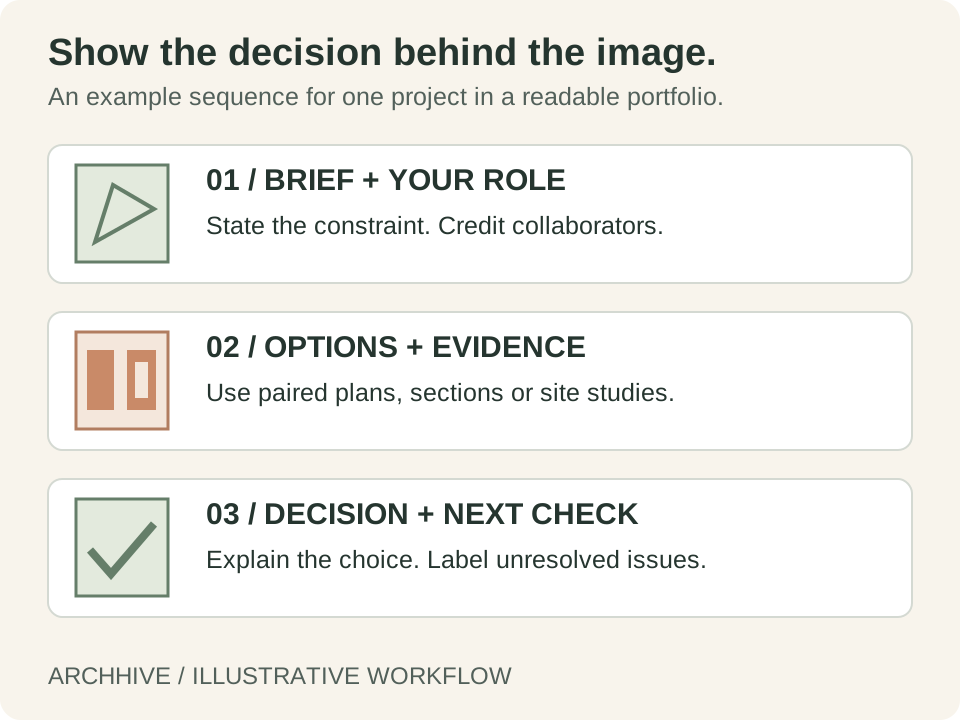
For each chosen project, begin with the brief, context and your role. State whether it is academic, personal, competition or professional work. If it was a team project, identify your contribution next to the relevant drawings. Give collaborators credit and obtain the necessary permission before sharing client or practice material.
An architecture student might select a site-based project to show the connection between context, massing and plan. An interior applicant might select a room or fit-out project to show activities, layout, section and specification. A professional applicant can use an authorised example to explain a coordination issue and its resolution. These are suggested editorial choices, not fixed requirements for every employer.
Explain one decision in each project
Use a short sequence: constraint, options, chosen response and evidence. A paired plan can show why circulation changed. A section can explain why a ceiling or window treatment was reconsidered. An option comparison can reveal how a massing decision responded to the site. Keep the captions concrete enough that the reviewer can connect the claim to the drawing.
If a result was simulated, estimated or proposed, label it accordingly. If a project was built, distinguish design images from completion photographs. Do not present an academic exercise as a commissioned project or claim responsibility for work done by someone else.
Make the application easy to review
Export a readable document within the employer's stated file limit. Check the PDF at ordinary laptop size and on a phone. Small labels, thin lines and crowded spreads often become harder to read outside the design screen. Include a compact index if the document is long, and verify that contact and portfolio links work in the exported file.
- Keep the project title, role and date easy to find.
- Choose drawings that support the responsibilities in the vacancy.
- Use captions to identify your contribution and key decisions.
- Follow the requested file format, naming and submission method.
- Open the final attachment and test its links before sending.
Maintain an application log
Record the employer, role, original source URL, checked date, portfolio version and submission date. Keep follow-up notes separately from your public portfolio. This prevents accidentally sending an old document or applying twice to the same opening under slightly different titles.
ArchHive's jobs page contains public listings, but an active database record is not a guarantee that the employer is still hiring. Follow the original application link and verify the opportunity yourself. Our source audit found working architecture and interior categories on Dezeen and a separate Livspace employer board; general careers invitations should be treated differently from specific vacancies.
Get Architecture and Interior Portfolios: Show the Work Behind the Images Resources on ArchHive
Browse professional materials, templates, and expert guidance related to this topic.
Explore ResourcesFound this useful? Share it
About the Author
Original workflow guides from ArchHive Editorial. Examples are illustrative; source links distinguish professional context from our suggested exercises.